• Skip to main content
  • Skip to primary sidebar

DallasDBAs.com

SQL Server Database Consulting

  • Services
  • Pocket DBA®
  • Blog
  • Testimonials
  • Contact
  • About

SQL

The Ironic DBA—Review One: A SQL Story

August 13, 2019 by SQLandMTB Leave a Comment

Welcome back to The Ironic DBA Files, a series where the newbie DBA on staff at Dallas DBAs chronicles the ups and downs of fast-tracking a new career as a DBA.

Last time around I related the exciting development of beginning to touch production servers. Now, with ten episodes in the can I think it’s time for a review of what I’ve learned and done so far. Stick with me as I hope to relate a few things I haven’t shared before, as well as some of my favorite tips, links, and resources that have helped me progresses as rapidly as reasonably possible.

What my brain looks like after a few months of DBA training.

A New Trail

I originally related how training to become a DBA was a new and unexpected opportunity, thus my reason for choosing the moniker “The Ironic DBA.” I’m not quite sure at this point whether I’m truly ironic, or using the word incorrectly like Alanis Morissette, but I digress…

Having a Senior DBA who can mentor you is absolutely the best approach to this career. I’m sure there are many intelligent people who could self-study and figure out all of this on their own via trial and error, but having an experienced DBA looking over your shoulder is one of the ways to progress much more quickly.

Not everyone can be as fortunate as I am to have a close friend be your personal coach, but that doesn’t mean you shouldn’t look for someone who can help you regularly, whether at your workplace or a local PASS meeting.

Mapping the Loops
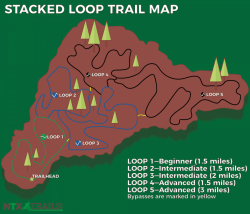
Stacked Loop Trail SystemIn mountain biking, we most often have trails that are full loops—loops that when followed from beginning to end bring you back to the trail head where you originally started. Some trail systems are stacked loop systems, where successive loops are “stacked” upon each other, connecting in such a way as to give users options for extended distance or varied routes. Trail systems are often constructed this way so that one or two loops can be opened to the public while successive loops are constructed and added over time. It’s also common that the successive loops increase in difficulty as you progress through the loops.

That’s exactly the approach we’ve taken with my DBA training. To start, you’ve got to get a handle on the basics like nomenclature, systems, and base-level architecture. What is a database? What does relational database mean? What’s an instance? Before I ever seriously considered becoming a DBA, I had already attended Kevin’s Free SQL Server DBA Training twice because I’m his friend and designer. He asked me to help him evaluate his teaching and presentation. This means I was pretty familiar with basic concepts before we started any sort of formal training.

From there, you can begin mapping out your loops in order of priority and difficulty. There are many different ways to map out these paths—another reason why a good mentor will be a great trail guide. If for some reason, you’re going it alone, I hope this post (and my series in general) will help you. I would also highly recommend these posts here on Dallas DBAs: Top 10 SQL Server functions every DBA should know by heart, and Dear Junior DBA…

For the record, and in an effort to not belabor my previous posts, here’s a breakdown of the “loops” I’ve traveled so far:

  • Learn about backups and restores
  • Learn about DBCC CheckDB, normalization, and security basics
  • Learn about instances, b-tree structure, and indexes
  • Learn about primary keys and clustered index keys
  • Learn about Maintenance Plans
  • Learn the basic of T-SQL syntax
  • Learn from your mistakes
  • Learn about Reoganize and Rebuild Index commands
  • Learn how to review client servers

But Wait…There’s More

As you might imagine, my weekly posts have only hit the high points and most critical information I’ve been gleaning. I’ve learned quite a few things along the way I haven’t written about previously, as well as collected several resources. Below is a sort of stream-of-consciousness recollection of other things I’ve learned that I think will help other Apprentice and Accidental DBAs kick-start their career. Excuse me while I scroll back in time in my Dallas DBAs Slack channels…

Since you’re going to be working on the files and file systems within SQL Server, get familiar with using the .mdf, .ndf, and .ldf standards. One of my first questions about these filetypes—because you can actually use whatever suffix you’d like (but shouldn’t)—was whether all three were identical filetypes. Kevin’s quick answer was, “No. There are (minimally) two file types… ‘Row Data’ (.MDF, .NDF) and ‘Log’…different internal structure that SQL writes to differently.”

By the way, this and other initial questions specifically came out of watching Kevin’s Pluralsight course, Getting Started with Your First SQL Server Instance. Use this as a foundation to get familiar with installing, updating, and uninstalling instances properly. And then get familiar with how to find and install test databases such as AdventureWorks, WideWorldImporters, and StackOverflow—using a test environment Azure VM if possible.

Oh, and get ready for a huge chunk of acronyms that look almost identical that you need to learn and know the differences: SSMS, SSIS, SSAS, SSRS…

I think I’ve mentioned it before, but staying on top of applying the latest Service Pack and Cumulative Updates to SQL Server instances is very important. A fantastic resource for quickly and easily finding the latest releases from Microsoft is the Microsoft SQL Server Versions List blog. You can drill down and find the correct version and download the appropriate SPs and CUs.

Being a visual person, I gravitated toward viewing Execution Plans early on. Of course, I didn’t understand a whole lot about what I was looking at, but it was good to begin getting familiar with the icons and arrows and such. Don’t sweat it, you’ll learn more and more about Execution Plans and how to read them as you move forward. Hint: Make sure you learn the difference between Estimated and Actual Execution Plans, and how to get those specific plan results.

A sneak peek at my Google Docs SQL Server training library.

I highly suggest building a Google Docs or Office 365 online library of notes and documentation on your journey.

I’m running out of space here, and haven’t covered anywhere near as much as I’d like, so I’m going to leave you with a couple of different lists I hope you’ll find helpful.

DBA Scripts and Tools

  • Ola Hallengren’s Ola Scripts
  • Brent Ozar’s First Responder Kit
  • Adam Machanic’s sp_whoisactive
  • SentryOne Plan Explorer
  • Stack Exchange’s Monitoring System: Opserver

Great Links for a New DBA

    • How to Think Like the SQL Server Engine
    • Free Downloads for Powerful SQL Server Management
    • PASS DBA Fundamentals Virtual Group
    • Redgate SQL Simple Talk Series
    • Introduction to SQL Server Security
    • SQL Server Central’s Stairways Archive

(I’m currently working my way through Stairway to T-SQL DML.)

  • SQL Skill’s Accidental DBA Series
  • How to Download the Stack Overflow Database
  • Kevin’s YouTube video on installing Ola Scripts
  • Adam Machanic’s sp_whoisactive Documentation

That’s all for this week. Join me next time for next episode in The Ironic DBA Files.

Follow me on Twitter at @SQLandMTB, and if you’re into mountain bikes come over and check out my site NTX Trails.

The Ironic DBA Files

      • Prequel: The Ironic DBA—Starting a New and Unexpected Career
      • Episode 1: You Back That Up?
      • Episode 2: Attack of the Corruption
      • Episode 3: Revenge of the Index
      • Episode 4: A New Primary Key
      • Episode 5: The Maintenance Plan Strikes Back
      • Episode 6: Return of the TSQL
      • Episode 7: The Backup Awakens
      • Episode 8: The Last Rebuild
      • Episode 9: Rise of the Clients

Follow @Dallas_DBAs

Filed Under: Apprentice, Beginner, Career, EntryLevel

IRL #5: Massive T-Log File

August 12, 2019 by Kevin3NF Leave a Comment

Problem:

I had a customer call in this week after struggling to resolve an issue for a couple of days,  Their Transaction Log file had grown to 400+GB and was filling the drive to the point they had to keep adding space to the drive to keep operations online.  This was for a core internal system.  There are no staff DBAs here, but plenty of very sharp sysadmins, developers, network folks, etc.

Note: I have written about the most common cause of this issue here, but this was not the resolution in this case. The embedded video is far and away number one in hits of all my SQL videos, showing just how common log file growth issues are.

Background:

  • Current SQL Server version
  • Data file around 90GB
  • Log backups enabled, occurring and verified (250MB or so every 30 minutes)
  • Replication not in play.

Investigation:

  1. Run DBCC OpenTran to see if some process was left hanging
  2. Check master.sys.databases.Log_reuse_wait_Desc for the database in question. See the “Wrapping Up” section for a proper query.
  3. Review Disk Usage report for the database – verify if the log file is full or just big and empty

Findings:

  1. Found an open transaction, sitting there since 2.5 days ago.
  2. sys.databases showed ‘Active_Transaction’ for our database, confirming Finding 1. Other possible values for log_reuse_wait_desc here
  3. Disk usage report showed the T-log was 99% used

Actions Taken:

  1. Received permission from application team to kill the SPID identified in DBCC Opentran
  2. Sys.Databases description changed to Log_Backup as expected
  3. Disk usage report now shows 99% unused.
  4. Fairly lengthy cycle of running Checkpoint, Log Backups and Shrink File attempts got us back to a 2GB .LDF file. The log file Autogrow was 10MB….we had 32K+ VLFs once the root problem was resolved by killing the spid
  5. Changed the Autogrow to 512MB in case this happens again to reduce the VLF count

Results:

  • Application performance immediately improved
  • Reclaimed 400GB of disk space
  • Educated my client on the basics of log file maintenance, how they are written to, etc.
  • Everyone slept well that night – no on call wakeups
  • Total time: 1 hour

Conclusion:

  • Most of the time this issue comes from a lack of log backups…but not always.  Be ready with the tools for deeper research
  • I was fully prepared to have them install sp_whoisactive if necessary for deeper digging
  • It pays to have a DBA in your Pocket if you are not going to (or don’t need to) staff one

Other posts in the IRL – In Real Life series:
https://dallasdbas.com/category/sql/irl/

Thanks for reading!

Kevin3NF

Follow @Dallas_DBAs

Filed Under: IRL, Troubleshooting

The Ironic DBA Files—Episode 9: The Rise of the Clients

August 6, 2019 by SQLandMTB Leave a Comment

Welcome back to The Ironic DBA Files, a series where the newbie DBA on staff at Dallas DBAs chronicles the ups and downs of fast-tracking a new career as a DBA.

It’s go time, ladies and gentlemen. Last week we reviewed indexes and the basic differences between reorganizing and rebuilding those indexes. Now, it’s time for the big reveal:

I’m allowed to touch client PROD servers!

A Funny Thing Happened on the Way to the Server

Thankfully, I didn’t have a ton of nerves logging into a client server for the first time, for two reasons.

First, as a WordPress developer, I’ve been in client accounts and such before. I’m aware that a company’s data can be more critical and sensitive than a WordPress blog, but both are important to that client. It doesn’t matter if it’s a multi-million dollar company or a food blogger’s site, you want to do your best and make sure you’re careful to do things correctly. Plus, one of my former WordPress clients makes seven-figures a year off her blog, so I can literally say her blog is every bit as critical as a company’s SQL Server database.

Second, our approach here at Dallas DBAs is very careful. Before ever logging into a client’s server on my own, Kevin first screen shared with me and I watched as he went through practices and procedures. Then, each day for the rest of the week we screen shared as he coached me through logging in and doing a server review. Only after a week of his oversight did he release me to begin solo server reviews on one client’s server. A couple of weeks later we went through the same process all over again with a second client. I’ll be adding a third and fourth client via the same processes in the coming days.

For now, my one and only task is to log into client servers daily and look for problems. I’m learning how to identify immediate red flag issues such as long waits, locks, and blocks. I’m checking the SQL Server error logs for anything out of the ordinary. I’m ensuring backups are up to date. And I’m learning how to effectively use monitoring tools such as Manage Engine, Solar Winds DPA, and Red Gate SQL Monitor.

As I go through this daily process, I’m learning how to properly report a server’s status to our clients, identify problems, and escalate those problems to Kevin. As an apprentice, it’s not my role to attempt to fix problems, but rather to stay engaged and learn how Kevin approaches making things right so that as I progress I add more and more knowledge to my tool belt.

Does This Look Right to You?

SQL Server Waits
One of these things is not like the others.

This is going to sound bad, but it’s sort of fun when a client’s server “breaks.” Let me explain.

If SQL Server and the underlying hardware always ran flawlessly then there wouldn’t be any need for DBAs, would there? In a way, being a DBA is mostly sitting around waiting for something to go wrong.

That’s not all there is to it. There’s consulting available where some DBAs help clients with architecture and hardware questions. A DBA might be consulted by a client who wants to upgrade their servers or systems. But let’s admit that the main action parts of the job involve putting out fires.

Those fires might be small, such as a client asking, “Why is this query so slow?” or “Can you help us implement a better maintenance schedule?” Other times it’s a 3 AM call from a client who’s panicking because someone accidentally dropped a server, a server died, a restore failed, or something else potentially catastrophic. That’s when a DBA really gets to serve their clients.

For me, that’s really the most exciting part about learning to be a DBA. What I do can have a real, significant impact on a client’s business and well-being. It’s an opportunity to serve.


If you take a look at the graph just above, as well as the graph further up the page, you’ll see an example of how my first week looking at a client’s server went. Long story short, this client had some growing pressure in their server in terms of wait and blocks. There were some regular overnight queries that were taking longer and longer to execute. Eventually this blocking was spilling over into the next hour and affecting subsequent performance.

Wanting the best for our client, I found myself feeling this strange mix of concern and joy over the situation. Concern that we as their DBAs needed to fix this, and joy that we were in a position to help. I had these feelings even though my only contribution to the whole incident was basically saying, “Hey, this looks wrong!” and escalating it to Kevin. But still, I had an opportunity to contribute and it was fulfilling.

In the end, it was an easy fix for our client. They discovered the query that was causing the issue was not critical and simply prevented it from automatically running from within their application. Problem solved. In fact, their server is now performing much better overall than it did before.

What’s the main point of all this, other than simply sharing more about what I’m learning? If you’re out there struggling to figure out what sort of work you should get into, I highly recommend finding that sweet spot where you not only find something you are good at and enjoy doing, but something that also allows you to serve others in some capacity. Serving others is where the long term rewards of any endeavor truly come from.

That’s all for this week. Join me next time for The Ironic DBA Files—Review One: A SQL Story.

Follow me on Twitter at @SQLandMTB, and if you’re into mountain bikes come over and check out my site NTX Trails.

The Ironic DBA Files

      • Prequel: The Ironic DBA—Starting a New and Unexpected Career
      • Episode 1: You Back That Up?
      • Episode 2: Attack of the Corruption
      • Episode 3: Revenge of the Index
      • Episode 4: A New Primary Key
      • Episode 5: The Maintenance Plan Strikes Back
      • Episode 6: Return of the TSQL
      • Episode 7: The Backup Awakens
      • Episode 8: The Last Rebuild

Follow @Dallas_DBAs

Filed Under: Accidental DBA, Beginner, Career, EntryLevel

Free SQL Server DBA training – Dallas 2019

August 1, 2019 by Kevin3NF Leave a Comment

Save the Date!

September 18, 2019 – Dallas, TX

8am – 5pm, lunch provided (probably pizza or Jason’s Deli)

Thanks to the awesome folks at Matrix Resources for donating their training room, we are able to offer a one-day DBA Fundamentals training class at NO charge!

This class is designed to be an overview of SQL Server for non-DBAs.  System Admins, developers, Oracle DBAs, Managers and anyone else that wants or needs to know more about how SQL Server works, We have presented this day of training at multiple SQL Saturday events as a pre-conference session.

Previous attendees said:

  • “Very Good excitement & interest in topic”
  • “Very engaging, knowledgeable, friendly.  Good session”
  • “Very informative and gave real life experiences.”
  • “I enjoyed the broad explanations helpful to beginners as well as those who are already DBA’s.”
  • “Kevin/Instructor was very knowledgeable and the information shared in the presentation was clear; presented well. I like the fact that it included to bases for those that were new to SQL”
  • “Perfectly fits the entry level need for understanding SQL Server.”
  • “Easy to understand.”
  • “First 7 or 8 hour presentation that I have ever been to where I did not drift off from the presentation mentally. This presentation kept me 100% engaged every minute.”

Check out this promo video to get an idea of what we will be learning:

Or, the non-video version:

I will teach you SQL Server fundamentals so that you will have confidence in:

• What makes up a SQL Server

• How a database is structured

• How to install and what to look out for

• Finding what you need in Management Studio

• SQL Security Basics

• How to create and manage backups

• How to create a database

• Picking a Disaster Recovery option for your environment

* topics may change on the fly depending on what the class wants

These are taught from a foundational standpoint, in simple to understand terms so that you can build on them with confidence. My teaching is heavy on interaction, with examples from years of experience/mistakes. There will be a mix of slides and demos. I’ll skip many advanced features that are out of scope of a beginner class, as I don’t want your head to explode! Join me for the day and you will walk out with a strong grasp of SQL Admin basics!

A word of caution – if you are already a SQL Server DBA with even a year of experience, you may be very bored in this class…

A special thank you to Pam Gates for helping reserve this training room at no charge to Dallas DBAs, so that we can offer this class for free!

Sign up here! There are only 24 spots available, due to the size of the TV I will be projecting onto.  I might open up more once I go in person and see if the farthest seats can see the screen clearly.

Thanks, and we look forward to meeting you!

Kevin3NF and the Dallas DBAs team


Filed Under: Accidental DBA, Beginner, Training

The Ironic DBA Files —Episode 8: The Last Rebuild

July 30, 2019 by SQLandMTB 1 Comment

Welcome back to The Ironic DBA Files, a series where the newbie DBA on staff at Dallas DBAs chronicles the ups and downs of fast-tracking a new career as a DBA.

Last time we took a quick look at getting started learning TSQL, and this week will keep it pretty basic as well. Let’s talk about indexes again.

Indexes Are Part of the Job

These bikes appear to be indexed.

Again? Yep, indexing properly is really the soul of how SQL Server operates. There’s a lot of physical and logical processing going on under the SQL Server hood, but server performance can live or die depending on the quality of the indexes.

Don’t believe me? Take a few minutes to watch Brent Ozar (b|t) give a quick tutorial on how to use the sp_BlitzIndex to see just the tip of the iceberg of indexing issues. (I won’t spoil it, but some of the terms for indexing problems are hilarious.)

Before we go too far here, let’s not get lost in the weeds. I’m learning that much of a DBA’s job is figuring out why SQL Server is running slowly. There are many reasons that could cause a server to bog down—from hardware issues to poorly written queries—and bad indexing is just one of those reasons.

Also, let’s always keep in the back of our mind that our job is to protect the data, so make sure you’ve got a handle on the basics of DBCC CheckDB and backups. If you don’t, you’re not ready for indexes.

Check out this quote from Erin Stellato (b|t) on why indexing takes a back seat.

I consider consistency checks, often referred to as CHECKDB, as one of the next most important tasks for a DBA.  And if you’ve been a DBA for a while, and if you know how much I love statistics, you might wonder why fragmentation and statistics take third place.  Well, I can fix fragmentation and out-of-date/inaccurate statistics at any point. I can’t always “fix” corruption.  https://www.sqlskills.com/blogs/erin/the-accidental-dba-day-13-of-30-consistency-checking/

By the way, if you haven’t read the Accidental DBA Series at sqlskills.com yet, what are you waiting for?

Indexes Need Love and Attention

Clustered index…c. 1950.

I have a perception that the typical Accidental DBA—once they learn about the power of indexes—takes a “set it and forget it” approach. It might even be tempting to sell ourselves the line, “Well, a bad or out-of-date index is better than no index.”

The problem is the F-word. Yep, I’m going there. I’m going to use the F-word on the Dallas DBA’s site and hope I don’t get fired. (Fired is a completely different F-word.) Here it is:

Fragmentation.

Do you ever remember the need to defragment your computer’s hard drive? It was periodically necessary because, as your operating system created, deleted, or changed information on your computer, the data was often seemingly placed willy-nilly around the hard drive’s available space. A document you created might literally have its bits split up and stored on different sectors of your HD, meaning the computer had to search harder to find all of the disparate file fragments every time you wanted to open that document.

The same basic principle is true in SQL Server. Remember back to the very beginning of your SQL Server studies when you were working on learning the underlying structure of how everything worked? Let’s review.

If you recall, all of the data in SQL Server’s tables is stored in 8K pages. Every time data is modified in a table then data is modified in related indexes as well. (Yes, I’m oversimplifying.) This means that the underlying data on those 8K pages gets shuffled around as necessary—fragmentation.

According to the MS Docs, “Fragmentation exists when indexes have pages in which the logical ordering, based on the key value, does not match the physical ordering inside the data file. Heavily fragmented indexes can degrade query performance and cause your application to respond slowly, especially scan operations.” 

So, what to do when your database is fragmented and begins running poorly? You’ve got two basic options—REBUILD and REORGANIZE—and you need to understand the differences between the two.

REORGANIZE: A REORGANIZE operation uses lower system resources than a REBUILD. It defragments the clustered and nonclustered indexes at the leaf level by physically reordering the pages to match the logical order of the leaf nodes. REORGANIZE also compacts the index pages based on the existing fill factor value.

REORGANIZE is performed online so table locks are not held. This means queries and modifications are not blocked during a REORGANIZE operation. REORGANIZE also does NOT update the statistics for the index, so you may need to consider an additional UPDATE STATISTICS operation.

REBUILD: A REBUILD operation completely drops and recreates indexes. This index rebuild removes fragmentation and compacts the pages based on a specified or existing fill factor setting. A REBUILD operation reorders the index rows in contiguous pages.

Since a REBUILD operation destroys and recreates indexes, it is a blocking procedure. Queries will be unable to access the index pages until the operation is complete. Because the REBUILD operation essentially recreates the index it must update the index statistics, so there is no additional need to perform an UPDATE STATISTICS operation.

Wait! Statistics? What’s that?

That, my friends, is a topic for a future discussion…

But wait! What’s this fill factor thing? (Gah! That’s two more F-words!)

Check out Brent Ozar’s explanation: “‘Fill factor’ is a setting for indexes in SQL Server. When you create or rebuild an index, you can tell SQL Server what percentage of each 8k data page used in the ‘leaf’ level of the index it should fill up.

In other words, if you set a 90% fill factor when you rebuild a clustered index, SQL Server will try to leave 10% of each leaf page empty. The empty space will be present on the page as it’s written on disk, and it’ll take up the same amount of space as it sits in memory.

By default, SQL Server uses a 100% fill factor and tries to fill up all the pages in indexes as close to full as it can. Depending on how many rows actually fit on the page.”

Does it seem like I’ve left a lot out that you should learn? Yes, I have. There’s only so much room in a single blog post and you owe it to yourself and your career to go do some digging on your own.

Hey, Senior DBAs! What are some issues related to this rebuild vs. reorganize discussion a newbie needs to know about? Tell us something you’ve learned that you wish you had known when you were a Junior. The comments await your wisdom.

That’s all for this week. Join me next time for The Ironic DBA Files—Episode 9: The Rise of the Clients.

Follow me on Twitter at @SQLandMTB, and if you’re into mountain bikes come over and check out my site NTX Trails.

The Ironic DBA Files

      • Prequel: The Ironic DBA—Starting a New and Unexpected Career
      • Episode 1: You Back That Up?
      • Episode 2: Attack of the Corruption
      • Episode 3: Revenge of the Index
      • Episode 4: A New Primary Key
      • Episode 5: The Maintenance Plan Strikes Back
      • Episode 6: Return of the TSQL
      • Episode 7: The Backup Awakens

Follow @Dallas_DBAs

Filed Under: Accidental DBA, Beginner, Career, EntryLevel

The Ironic DBA Files—Episode 7: The Backup Awakens

July 23, 2019 by SQLandMTB Leave a Comment

Welcome back to The Ironic DBA Files, a series where the newbie DBA on staff at Dallas DBAs chronicles the ups and downs of fast-tracking a new career as a DBA.

In the last post I talked about how I don’t enjoy coding all that much and how I once dreaded the idea of being a DBA due to the use of TSQL here and there. I’ve gotten over that fear and made some pretty decent strides in beginning to understand how the code works. Getting a basic grasp on the syntax does wonders for understanding what’s going on in a particular script.

You Don’t Know What You Don’t Know

I’ve had a practice Azure VM with an instance of SQL Server 2016 installed almost since day one in my training. The purpose of the VM is to give me a place to get familiar with the workings of SQL Server and it’s associated tools like SSMS.

I wrote a couple of weeks ago about implementing Maintenance Plans on my VM. I was taking regular backups and performing regular maintenance on the instance’s databases, but not really doing anything with it. In my studies, I’ve read and heard over and over that “you don’t have a valid restore plan until you’ve practiced restoring your backups.” So, I decided it was time to get that done.

I decided to approach my restore plan as if I were restoring to an off-site Dev or QA instance. I don’t have one of those, but Kevin had recently added a second, larger E: drive to the VM. So my thought process was to install a new instance of SQL 2016 on the E: drive and then restore my backups to that instance.

This was also a good refresher on installing and updating a new instance to the most current SP and CU. One of the things I’m seeing often when Kevin works with clients is that some of their server issues can be at least partially resolved by simply updating to current SPs and CUs. I’ve tried to internalize this and make it part of my regular instance install routine.

Once my instance was up and running, I started searching for the best way to restore my backups to the new instance. I found the script below and gave it a go.

RESTORE VERIFYONLY
FROM DISK = N'F:\SQLskills\20130609_SalesDB_Full.bak
WITH CHECKSUM;
GO

As you might see, this script was taken from sqlskills.com, and I had to tweak it be valid for my server, such as changing VERIFYONLY to DATABASE and naming the correct database and file names and locations on my E: drive. Simple, right?

Not. Even. Close.

I can’t go into much detail here simply because it would make this post as long as a short novel. Long story, short, the rest of my day and part of the next day was a revelation of rookie mistakes, including, but not limited to:

  • Unfamiliar drive and folder permission problems on Windows
  • Forgetting about Recovery Models when not finding log backups for some databases
  • Not checking the error logs like I should have when problems arose

This sort of thing went on and on before I eventually threw in the towel and asked Kevin for help. He got me sorted out pretty quickly—as a Senior DBA should—and I was back on track restoring my backups.

Rookie Mistakes are Expected

Guess what? Rookie mistakes are part of the process. It’s very much like riding a mountain bike. You are going to crash when you push yourself to the next level. You’re going to forget how to handle certain difficult situations and need guidance.



What this really means is you’re striving to move forward. Learn from your mistakes and add the new-found knowledge and skills you earned from failure and recovery to your tool kit.

You see, not only is Kevin my Senior DBA guiding me through all of this, he’s also been my mountain bike coach since I started riding trails. This is why I emphasized last week about the need to find a mentor if you don’t already have one.

When I’m riding trails alone I tend to be much more cautious and stay well within my skills and experience. However, when I’m riding with others, especially when I have Kevin in front of me showing the way, I’m much more apt to push myself and try new things—even things that scare me.

That was my approach during this whole backup/restore episode. I wasn’t on a Prod server and I knew that Kevin was right there to help me when I needed him. He patiently showed me not only what I was doing wrong, but pointed out things I didn’t know about or had forgotten such as looking at all the options in the Restore Database dialog to properly name my databases and select the file locations.

As a side note, I mentioned before about how part of my problem was a permissions issue that was specifically a Windows thing. I’ve noted before how I’m a long-time Mac user, and one of my main problems in this restore process was simply the differences in the Windows file tree system. Even once I was able to restore my databases properly they were not getting saved where I really wanted them because of one simple click—an unnecessary click in the Mac OS Finder, but absolutely necessary in Windows Explorer.

It’s all part of the process, and I’m getting there one step at a time. Even if some days it’s two steps forward and one step back, progress is being made.

That’s all for this week. Join me next time for The Ironic DBA Files—Episode 8: The Last Rebuild.

Follow me on Twitter at @SQLandMTB, and if you’re into mountain bikes come over and check out my site NTX Trails.

The Ironic DBA Files

    • Prequel: The Ironic DBA—Starting a New and Unexpected Career
    • Episode 1: You Back That Up?
    • Episode 2: Attack of the Corruption
    • Episode 3: Revenge of the Index
    • Episode 4: A New Primary Key
    • Episode 5: The Maintenance Plan Strikes Back
    • Episode 6: Return of the TSQL

Follow @Dallas_DBAs

Filed Under: Accidental DBA, Beginner, Career, EntryLevel

  • « Go to Previous Page
  • Go to page 1
  • Interim pages omitted …
  • Go to page 17
  • Go to page 18
  • Go to page 19
  • Go to page 20
  • Go to page 21
  • Interim pages omitted …
  • Go to page 37
  • Go to Next Page »

Primary Sidebar

Search

Sign up for blogs, DBA availability and more!

Home Blog About Privacy Policy
  • Home-draft
  • Blog
  • About Us

Copyright © 2026 · WordPress · Log in


Loading Comments...