• Skip to main content
  • Skip to primary sidebar

DallasDBAs.com

SQL Server Database Consulting

  • Services
  • Pocket DBA®
  • Blog
  • Testimonials
  • Contact
  • About

Beginner

Determine an Index Size in SSMS

July 28, 2017 by Kevin3NF Leave a Comment

Quick post today…I needed to find a quick way to get the size of a specific index without using T-SQL.

Tables are easy…right-click>>Properties>>Storage.   Indexes don’t have a storage option.   You can get the sum of all indexes on a table from the “Disk Usage by Top Tables” built-in report, but not one by one.

To do it in the SSMS GUI, expand the Database>>Tables>>Indexes:

SQL Index Table Size


Right-Click the index in question, select “Properties”, then “Fragmentation.”:
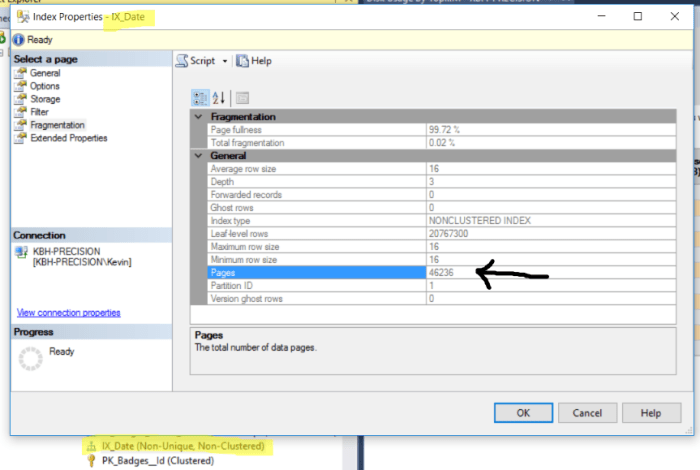
index fragmentation

As we know, pages are 8KB, so now its just a simple math problem:

46236 pages x 8 KB /1024 to get to MB = 361 MB (rounded for conversation’s sake):

SQl Server Index size calculator

If you need more than one, but not all…you’re going to need to Google up some T-SQL to run.  I found a variety of ways to do it, and didn’t like any of them.

Thanks for reading!

Kevin3NF

Follow Dallas DBAs on LinkedIn


Filed Under: Accidental DBA, Beginner, Indexing Strategies, SSMS

Database Delete vs. Detach vs. Offline

May 31, 2017 by Kevin3NF Leave a Comment

If you haven’t been asked to Delete a database in your DBA career…its just a matter of time:

“We don’t need database XYZ anymore…delete it.” — Some well meaning manager

Stop right now, before blindly following an order like that.

First…there are some questions to ask:

  • What environment is this? (Prod, Dev, etc.)
  • Are you sure we don’t need it?
  • Has anyone verified that?
  • When was it last used?
  • Did something replace it?
  • Is it backed up?

As a DBA, any time anyone asks you to delete anything, from data to an entire database, you need to question it.  Not doing so can be a CLM/RGE combo!  (Career Limiting Move/Resumé Generating Event)

The request may be perfectly valid, but in my experience most people that ask for a database to be deleted use the term to mean “I don’t want to see that database in SSMS anymore” or “I don’t want it on Server A, put it on Server B”, with very little regard for impact to other teams or applications.

There are three main ways to take a database “out of service”:

  • Take it Offline
  • Detach it
  • Delete it

Each has its own considerations and each is the proper choice in different circumstances.  I am going to walk you through each one, from least risky to most, in that order.

Offline:

Takes the database offline, but still visible in SSMS.  Cannot be accessed by applications, backups, etc.   Can be brought back online relatively quickly.

My list of databases before starting this post…we’ll be messing with the Rename2222 database (nothing in it…came from a rename script I was writing/testing):

Right-click the database in question, Tasks, Offline:


Dialog Box you get after clicking “Take Offline”:

Note 1: You do not get the below dialog in SSMS 2014 (and possibly earlier)…this was done using SSMS 2016.
Note 2:  If you click the Script button, it will take the database offline in SSMS2016, instead of generating a script.  I’m told this is resolved in SSMS 2017.


Results in SSMS after Offline Operation:

Upside to Offline method: Database is still in place,  visible in SSMS, Record in master database is still there, relatively simple.

Downside to Offline: May cause SQL Monitoring tools to throw alerts and create tickets, files are not in use by SQL Server, can be deleted.

Detach:

Removes the database from SSMS, deletes its meta information in the master database, but leaves the physical files intact on the drive.

The detach menu:

The detach dialog:

Choose “drop connections” here…if not, the detach may fail.  Or, leave it unchecked as a test to see if anyone is using it

After Detaching:

Note that the MDF/LDF files are still right where they were.  SQL Server no longer has a handle on them:

You can re-attach fairly quickly should the need arise (i.e. user comes screaming at you 5 minutes after the detach):

Right-click “Databases”, select Attach


Click ‘Add’ and browse for the .MDF file….should find and include the .LDF file on its own


Click ‘OK’ to attach

Upside to Detach method: Files are still in place, re-attach is fairly straightforward, Monitoring tools will generally not error. Can save your job by not having deleted a database someone else needed.

Downside to Detach: Files not manually deleted take up disk space…set reminders to delete after some time period.

Delete:

Drops the database, its meta data in Master, AND its associated physical files…you cannot reverse a Delete (DROP Database).

This is one of those “Stop right here” moments.  Before you Delete a database, make very sure you are following protocols.   Make sure you have a recent FULL backup:


If not, run one.  The simplest possible command to backup a database:

 -- backs up to default location

Backup Database Rename2222 
To Disk = 'Rename2222.bak'

Better:

-- backs up to specified location 
-- with date included in the file name:

Backup Database Rename2222 
To Disk = 'c:\MyBackups\Rename2222_20170531.bak' 

Once you have a backup, you also should get a ticket, change control, or at the very minimum an email from the requester with approval for the delete.  Depends on your process.   Especially important if this is a production environment.   This can save your job.  If you Delete a database that a system depends on and cause an outage…whoever told you to do may claim they were not involved.

To delete is way too simple:

Deleting backup/restore history is up to you.  Drop all connections to force everyone out.  
If anyone is connected, should you be deleting?

Remember…once you Delete a database…its gone.   The ONLY ‘undo’ is to restore from Backup.   You can call Microsoft, but they will tell you the same thing.  Worst case, you can spend tens of thousands of dollars on a data recovery service, assuming you can take the server down and nothing overwrote the space the the files were in on the drives.

EDIT: If you take a database into “Offline” state, then delete it – the physical files will still be on the drive. Not sure if this is accurate in ALL SQL Server versions, so detach first.

Wrap up:

Almost everywhere I’ve worked, Detach with a 2-4 week follow up to delete the files was the best choice.   But beware that some systems may only be useful for Quarterly or Annual reporting.  In an ideal situation, you have a complete inventory of every database on every server from Production down to Dev and know exactly why they are there, as well as who the stakeholders are for each one.  If you don’t have this for the O/S, SQL and DB level info, start now.

Thanks for reading!

Kevin3NF

My Pluralsight course for new DBAs

Follow @Dallas_DBAs

Filed Under: Accidental DBA, backup, Beginner, EntryLevel

SQL DBA Fundamentals training, Day 2

May 27, 2017 by Kevin3NF Leave a Comment

Day 1 of the free DBA fundamentals was a huge success!!  Thanks to all that came out.

Day 2 (June 7) registration goes live at noon on Saturday, May 27 (still free):

RSVP here

This is an in-person class…not online and not recorded.  We are not that fancy yet…

We will be covering the following:

  • SQL Server Security model (in plain English)
  • A guided tour of SQL Server Management studio

You do not need to bring a laptop, but if you have one with SQL Server and SSMS installed to follow along, please feel free to bring it.

You do need to be registered to attend…we completely filled our space last Wednesday, with no room for walk-ins.  Please do not just show up and make me have you stand in the corner 🙁

There will be a waitlist when the tickets are gone.

If you came to Day 1 and sent me a request, you are already registered for Day 2.

Thanks, and see you there on June 7!

Kevin3NF (follow me on Twitter…its your homework!)

Filed Under: Accidental DBA, Beginner, Career, EntryLevel, SQL

Free SQL Server DBA Fundamentals training (DFW) – completed

May 4, 2017 by Kevin3NF 2 Comments

Free.  In person.  Interactive.

Update: This is in-person only…not online or Webex at this time.

I really like training and teaching the basics of anything to people new to it.  Right now that is SQL Server, and cycling (I am Kevin3NF or CoachKev depending…).  Every day on the various forums I see the same questions over and over on basic tasks…and the askers go away with a solution but very often they don’t get the understanding to be able to resolve the issue on their own the next time.

So…if you are in or near the Dallas/Ft. Worth, Texas area and have a couple of hours free after work once every 2 weeks come join me for some very informal training.

Target audience:

  • Managers
  • Developers
  • SysAdmins
  • Students (college, tech schools, etc.)
  • Very junior/accidental DBAs that are struggling to stay afloat

If you are already a DBA, this is probably not for you unless you are just starting out.

RSVP for Day 5 here

5 weeks, every other Wednesday 6-8pm starting on May 24, 2017 in Richardson, TX.

  •  Day 1 (May 24):
    • Intro to databases, with a little history thrown in
    • Installing SQL Server 2016/2014 (on your laptop)
  • Day 2 (June 7):
    • Getting around in SQL Server Management Studio
    • SQL Server Security Model
  • Day 3 (June 21):
    • Backup Basics…the Why, followed by How
    • Creating a database from scratch, or from a backup
  • Day 4 (July 5):
    • Database querying basics – getting the CRUD
    • Indexing and basic performance troubleshooting
  • Day 5 (July 19):
    • High Availability/Disaster Recovery options (overview)
    • Wrap up

If this goes as well as I hope, I will offer it again after some time off.  Maybe in a different part of the Metroplex.

Not sure if this class is right for you?  Ask in the comments, send me a DM on Twitter, or email me.

Thanks for reading!

Kevin3NF

Follow Dallas DBAs on LinkedIn:

Filed Under: Accidental DBA, Apprentice, Beginner, Career, EntryLevel, Speaking

SQL Saturday Houston, 2017

April 27, 2017 by Kevin3NF Leave a Comment

I will be presenting my session “Backups for non-DBAs…the Why, not the How” at SQL Saturday Houston on June 17.

Abstract:

Join me and get some new perspective on what your DBA is doing, and why!

Targeted at the non-DBA such as BI/DW folks, Application Developers, Managers, and System Admins, this session will go over the reasons we back up our databases, our systems, etc. Considerations such as Single points of failure, High Availability/Disaster recovery, Business Continuity and others will be discussed in this interactive conversation. It will be conversation heavy, with supporting slides to download, and one Database backup demo at the end if time permits.

Everyone involved in a technical role needs to at least know that the things they have created will be recoverable in the event of a disaster, or even just an “oops” moment. The CIO/CTO should know how long critical systems will be down when bad things happen.

Backups are everyone’s responsibility…whether asking the right questions or implementing the process.

If you come on Friday, there is a pre-conference full day of training on Performance Tuning by Brent Ozar…$199 as of this post for a full day of awesomesauce. Or, my friend Tim Mitchell (b|t) will teach you how to build better SSIS packages for $129.

Hope to see you there!

Kevin3NF

Filed Under: Accidental DBA, backup, Beginner, Speaking, SQLSaturday

How I became a:________________

April 3, 2017 by Kevin3NF Leave a Comment

Thanks to Andy Warren (b|t) for this idea….

I am starting a collection of “How I Became A _____________” stories and will be aggregating them right here.   Your contributions are welcomed and encouraged.  You can email me some text, send me a link to your blog where you write it up, or even a video on YouTube if you have it.  Include what section below it should go in.  Longer submissions would be better as links to your blogs, shorter ones work as just text if you prefer.  Add your link as a comment, and I’ll delete that after incorporating into the list.

For now, I’d like to stick with items in and around the database world…DBA, Developer, Architect, BI pro, Database Manager, SQL Server, Oracle, etc.

The goal here is to have a place for people considering database work as a profession a place to go to get more info direct from the mouths of those of us already in the industry.  Lets keep the contributions family-friendly and encouraging!


Database Administration:

  • Jeff Miller (t) reboots his career and joins the Dallas DBAs staff
  • Andy Levy (b|t) finds out he has DBA tendencies…
  • Arun Sirpal (b|t) never stops learning!
  • Michael D’Spain, the landlocked surfing DBA musician shares his story
  • David Alcock (b|t) shares his path to DBA, along with tips for those considering the idea from across the pond.
  • Jr. DBA Julie (t) shares her story
    The story of how I became a SQL database administrator is … less than glamorous. Without going into specifics, I found myself at 35 years old in the position of needing to change careers – and needing to do so at a breakneck speed, because quite unexpectedly I became the sole provider for my family. I had a bachelor’s degree in art, few marketable skills, no professional job history for the past 10 years, and the weight of the consequences of failure breathing hard down my neck.
    So I reached out. I talked to people. I spammed my Facebook and Twitter feeds, asking people what it was like in their industry – what the job prospects were, what the working conditions were like, what the requirements were, what the long term growth potential might be. I made sure everyone I knew was aware I was looking for a job.
    I did not get a single response to the resumes I submitted to job postings. I DID get a response from my friend Jen McCown, who asked me one day if I’d like to do grunt DBA work for her home consulting business. YES, I said, I would love to do that.
    “Is this a pity job?” I asked her.
    “No no no,” she lied.
    Jen and her husband Sean spent a good part of the next couple of months training me to be a DBA. It was very difficult, as the learning curve was so steep as to be nearly vertical. I lived, breathed, ate and slept databases. I was keenly aware of what failure would mean, for me and my children, if I didn’t nail this. I remember one instance where I was sitting with my youngest child while he fell asleep, and he was annoyed by the light of my laptop and the click of the keys as I worked on some issue or other.
    “I hate databases,” he grumbled and pulled the covers over his head.
    At the moment, I kinda hated databases, too.
    Several months later, Sean introduced me to the folk at a local company, who had a position open for a junior DBA. They needed someone who could do backups and restores, document procedures, run queries, and look into basic problems like blocking and security access. I got the job.
    I’m almost three years into a DBA career now, and I am occasionally reminded with great humility and gratitude that I would not be here without Sean and Jen. I was lucky. But I am coming to realize that all of us have a Sean-and-Jen – people who opened up doors with opportunities for work. So how would I apply my experience becoming a DBA to others? To a certain extent, you have to make your own luck. Networking is the single greatest avenue to luck, but a lot of work comes before and after the opportunity presents itself. Have your resume together, read articles and books, take training courses and certifications, go to user group meetings and such. Most importantly, be prepared to work your butt off. Database work, especially in the beginning of a career, may mean a lot of late nights, even overnights. It’s not for everybody, but it certainly is a great path.
  • Chris Yates (b|t) – The SQL Professor
  • Anders Pederson (b|t) in 2 parts:
    • About Anders
    • Anders gives Access the boot
  • @SQLAndy: How to Become a SQL Server DBA (whitepaper, site registration required)
  • DBA Kevin Hill gives an email interview

Database Consultant:

  • David Alcock (b|t) turns to Consulting!
  • Matt Gordon (b|t)- Support Analyst to Consultant

Database Developer:

Business Intelligence/Analytics:

Database Management:

ETL Developer:

Database Architect:

Teacher/Presenter/Speaker:

  • Erin Stellato’s (b|t) 20 year presenting journey
  • John Deardurff (b|t), Trainer – Database on a Dare


Filed Under: Accidental DBA, Beginner, Career, Oracle, SQL

  • « Go to Previous Page
  • Go to page 1
  • Interim pages omitted …
  • Go to page 7
  • Go to page 8
  • Go to page 9
  • Go to page 10
  • Go to page 11
  • Interim pages omitted …
  • Go to page 13
  • Go to Next Page »

Primary Sidebar

Search

Sign up for blogs, DBA availability and more!

Home Blog About Privacy Policy
  • Home-draft
  • Blog
  • About Us

Copyright © 2026 · WordPress · Log in


Loading Comments...


