• Skip to main content
  • Skip to primary sidebar

DallasDBAs.com

SQL Server Database Consulting

  • Services
  • Pocket DBA®
  • Blog
  • Testimonials
  • Contact
  • About

Indexing Strategies

Determine an Index Size in SSMS

July 28, 2017 by Kevin3NF Leave a Comment

Quick post today…I needed to find a quick way to get the size of a specific index without using T-SQL.

Tables are easy…right-click>>Properties>>Storage.   Indexes don’t have a storage option.   You can get the sum of all indexes on a table from the “Disk Usage by Top Tables” built-in report, but not one by one.

To do it in the SSMS GUI, expand the Database>>Tables>>Indexes:

SQL Index Table Size


Right-Click the index in question, select “Properties”, then “Fragmentation.”:
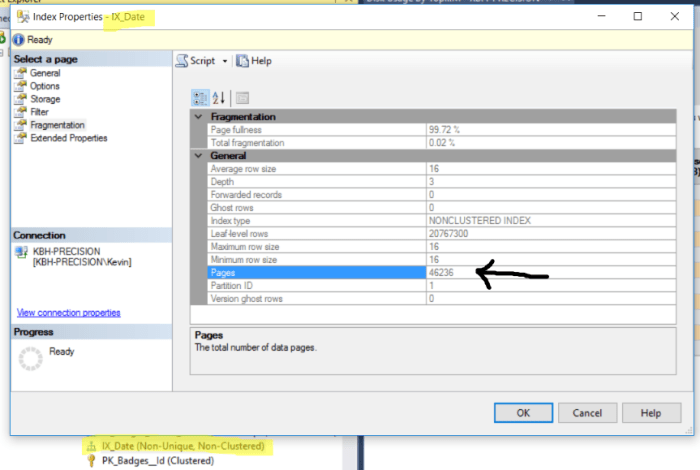
index fragmentation

As we know, pages are 8KB, so now its just a simple math problem:

46236 pages x 8 KB /1024 to get to MB = 361 MB (rounded for conversation’s sake):

SQl Server Index size calculator

If you need more than one, but not all…you’re going to need to Google up some T-SQL to run.  I found a variety of ways to do it, and didn’t like any of them.

Thanks for reading!

Kevin3NF

Follow Dallas DBAs on LinkedIn


Filed Under: Accidental DBA, Beginner, Indexing Strategies, SSMS

T-SQL Tuesday: Shiny New Toys

February 14, 2017 by Kevin3NF 1 Comment

T-SQL Tuesday is a blog party started by Adam Machanic (b/t) over five years ago. The first Tuesday of each month a blogger hosts the party and suggests a topic. Anyone who is interested blogs on that topic on the second Tuesday. It can be a lot of fun and quite a challenge to blog on a topic you didn’t pick.

This month’s topic is presented by Matt Gordon (b/t), who has challenged us to write about “Fixing Old Problems with Shiny New Toys”, specifically new items introduced in SQL 2014 and up.

True to my typical post style which focuses on small shops, accidental DBAs, and junior DBAs I went looking for something that could very easily benefit people that are using the basic SQL Server features.  In this case they may not even realize how limited they were.

I chose to write about Index Maintenance in the built-in Maintenance Plan portion of SQL Server.

A brief summary of the built-in Maintenance Plans is that they allow you to drag-and-drop your way to basic SQL Server maintenance items such as Backups, Index maintenance, CheckDB, Statistics updating, etc.  This a tool that has been around since at least version 7 that I know of.  It wasn’t always very good, and it gets a bad rap from a lot of DBAs.  It has been dramatically improved over the years in flexibility and reliability.

In SQL 2014 and before, you had a choice to rebuild or reorganize indexes, and it was pretty much an all or none proposition.  There were a few options, but still limited.  If you wanted to get granular, you needed to roll your own code, buy a 3rd party utility, or use something like Ola Hallengren’s free scripts (known everywhere as the “Ola scripts“).

2014 Rebuild task…a few choices, but not a lot.

2014 Reorganize Index dialog…even fewer choices:

Don’t misunderstand me…its great that these options are available, especially for the SQL Server customer that doesn’t have a DBA or the budget for a 3rd party product.   The biggest downside is that they will rebuild EVERY index on the selected database(s)…whether it needs it or not.  This can cause significant blocking, resource usage and transaction log files that can grow way beyond what is expected.

In SQL 2016, Microsoft introduced the ability to Rebuild or Reorganize based on Fragmentation %, Size of the Index (page count) and usage:

These options allow you to rebuild at whatever levels make sense to you. Taking a hint from the Ola Scripts, I set mine to rebuild everything over 30% fragmented, and over 500 pages in size.  “Used in the last xx days” is a nice feature as well.  The stats sampling option is something I didn’t know was there until I started writing this!

Similarly, Index Reorganize is also now allowing you to get more granular:

These options give the small SQL shop the ability to “set it and forget it” in ways that are more intelligent than previously available.

Pro tip….do the rebuild first, so you don’t accidentally Reorganize everything over 5%, including the ones over 30%…

There are dozens of articles and blogs on Rebuild vs. Reorganize, so I won’t re-hash that here…but I will Google it for you.

Many DBAs will scoff at this and turn up their nose at SQL Maintenance Plans…but they definitely have their place.  Not every shop can use a “free” product such as the Ola Scripts, or have budget for MinionWare.   An additional great aspect of this is that since Microsoft wrote it, they support it!

Large shops with multiple instances, and a DBA staff…go get ’em!  If you are a small shop looking to upgrade from 2008, R2, 2012…this is only available in 2016…which just runs faster, and has lots of Shiny New Toys!

Thanks for reading,

Kevin3NF

Filed Under: Accidental DBA, Beginner, EntryLevel, Indexing Strategies, TSQL2sday

  • « Go to Previous Page
  • Go to page 1
  • Go to page 2

Primary Sidebar

Search

Sign up for blogs, DBA availability and more!

Home Blog About Privacy Policy
  • Home-draft
  • Blog
  • About Us

Copyright © 2026 · WordPress · Log in


Loading Comments...


